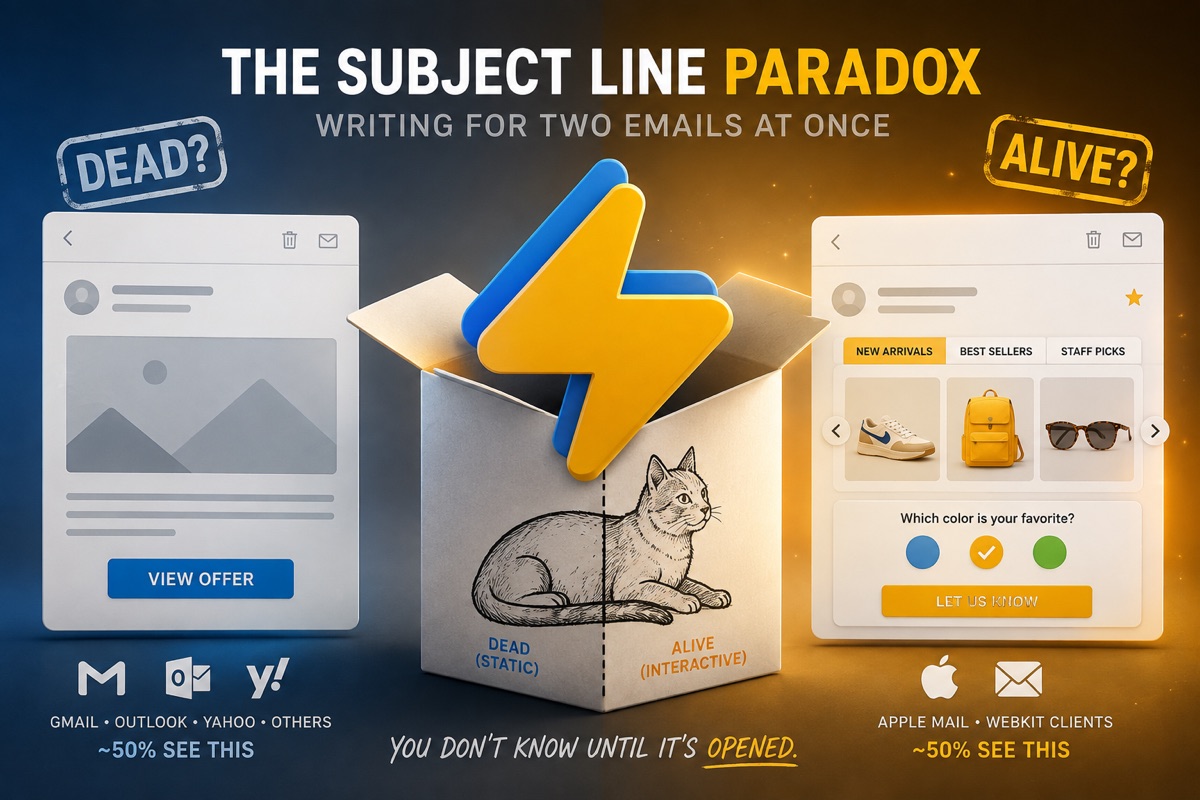
The Subject Line Paradox: Writing for Two Emails at Once
By Sean · April 9, 2026 · 5 min read
Schrödinger put a cat in a box — alive and dead at the same time until someone opened it and forced the universe to pick. Every kinetic email you send is in the same superposition. Until your subscriber opens it, it's both emails at once: alive and interactive — tabs, carousels, surveys working right inside the inbox — and dead-simple static, a plain fallback for clients that strip the CSS that makes it all work. Is the email dead or alive? You don't know until it's opened.
Your subject line has to sell both.
The Trap Most Kinetic Email Senders Fall Into
It's tempting. You've just built a beautiful interactive email with a working carousel, embedded quiz, or tabbed product showcase. The subject line practically writes itself:
- "Check out this interactive email!"
- "Swipe through our new collection — right in your inbox"
- "This email has a working quiz inside"
Here's the problem: only ~50% of your audience will see the interactive version. Apple Mail and a few webkit-based clients support kinetic CSS. Everyone else — Gmail, Outlook, Yahoo — gets the fallback.
When a Gmail user opens your email expecting an interactive experience and sees a static layout with a button, you've broken a promise before they even start reading. That's not a deliverability problem. It's a trust problem.
The Rule: Write for the Fallback, Let Kinetic Be the Surprise
The best kinetic email subject lines follow one principle: they must be true for both versions.
If your subject line makes sense when the recipient sees a static email with a CTA button, it works. If the recipient happens to be on Apple Mail and gets the full interactive experience, that's a delightful bonus — not the expectation.
| Bad Subject Line | Why It Fails |
|---|---|
| "This email is interactive!" | 65% of recipients see a static email |
| "Swipe through our catalog" | There's nothing to swipe in Gmail |
| "Play our in-email game" | Outlook users see a button, not a game |
| Good Subject Line | Why It Works |
|---|---|
| "5 products, one email — find your favorite" | Works whether they browse tabs or click a button |
| "Quick question: which style fits you?" | Works as a quiz or as a link to a quiz |
| "Your spring collection is here" | Product showcase — interactive or static |
The Exception: When "Interactive" Subject Lines Actually Work
There's one scenario where leaning into interactivity in the subject line makes perfect sense: when the fallback CTA mirrors the interactive experience.
Consider a survey or quiz email. The kinetic version lets you answer questions right inside the inbox. The fallback version shows a prominent CTA button:
Take the Quiz →
Now think about the subject line:
"Take our 30-second style quiz"
This works in both scenarios:
- Apple Mail user: Opens the email, sees an interactive quiz, takes it right there. Subject line delivered on its promise.
- Gmail user: Opens the email, sees "Take the Quiz" button, clicks it, takes the quiz on the web. Subject line still delivered on its promise.
The subject line didn't promise where the quiz happens — just that there is one. The CTA button language aligns perfectly with the subject line regardless of which version renders.
This alignment pattern works for:
- Surveys — "Tell us what you think" → interactive form or "Share Your Feedback" button
- Quizzes — "How well do you know X?" → embedded quiz or "Take the Quiz" button
- Polls — "Vote for your favorite" → in-email voting or "Cast Your Vote" button
- Feedback — "Rate your experience" → star rating widget or "Leave a Review" button
The common thread: the action described in the subject line is achievable through both the interactive element and the fallback CTA.
A Framework for Kinetic Subject Lines
Before writing your subject line, answer this question:
"If this email renders as a single hero image and a button, does my subject line still make sense?"
If yes, ship it. If no, rewrite it.
Here's a practical framework:
1. Lead with the Value, Not the Mechanism
Instead of describing how the email works, describe what the reader gets.
"Browse our interactive lookbook"→ "The spring lookbook is here""Spin the wheel for a discount"→ "Your surprise discount is waiting"
2. Use Action Verbs That Work Both Ways
Some verbs imply clicking a link or interacting within the email:
- Explore — works for tabbed content or a link to a landing page
- Discover — works for a carousel or a product page
- Choose — works for in-email selection or a preference center link
- Find — works for an interactive search or a curated collection
3. A/B Test the Curiosity Gap
The curiosity gap works especially well for kinetic emails because the interactive version delivers a richer payoff:
- "We picked 3 products for you — did we get it right?"
- "One of these is 50% off. Can you guess which?"
- "Your results are in"
These subject lines drive opens regardless of email client, and the kinetic version makes the reveal more engaging.
4. Personalization Compounds Interactivity
According to industry benchmarks, personalized subject lines lift open rates by 20-30%. Combined with interactive content, you're stacking two engagement drivers:
- "Sarah, which plan fits your team?" → tabbed comparison or link to pricing
- "Your week in review" → interactive stats dashboard or summary email
Subject Lines by Kinetic Email Type
| Email Type | Subject Line Example | Why It Works |
|---|---|---|
| Tabbed product showcase | "3 new arrivals worth a look" | "A look" = tabs or click-through |
| Carousel | "This season's top picks" | Browse in-email or on-site |
| Accordion FAQ | "Your top questions, answered" | Expand in-email or read on page |
| Survey/Quiz | "Quick question — we need your input" | Answer in-email or via link |
| Interactive menu | "Everything new this month" | Navigate in-email or on-site |
| Reveal/scratch-off | "Something special inside" | Reveal in-email or click to see |
The View-in-Browser Safety Net
One more thing worth noting. If your email includes a "View in Browser" link (and it should), you have an additional safety net. Any recipient on a non-supporting client can click through to a hosted version that renders the full interactive experience.
This doesn't change the subject line advice — you should still write for the fallback — but it means the interactive experience is always one click away for engaged readers. The subject line gets them to open. The "View in Browser" link gets them to interact.
The Bottom Line
Kinetic email is about delighting the people who can experience it, not alienating the people who can't. Your subject line is the first promise you make. Make sure it's a promise every recipient's inbox can keep.
Write for the fallback. Let the interactivity speak for itself.