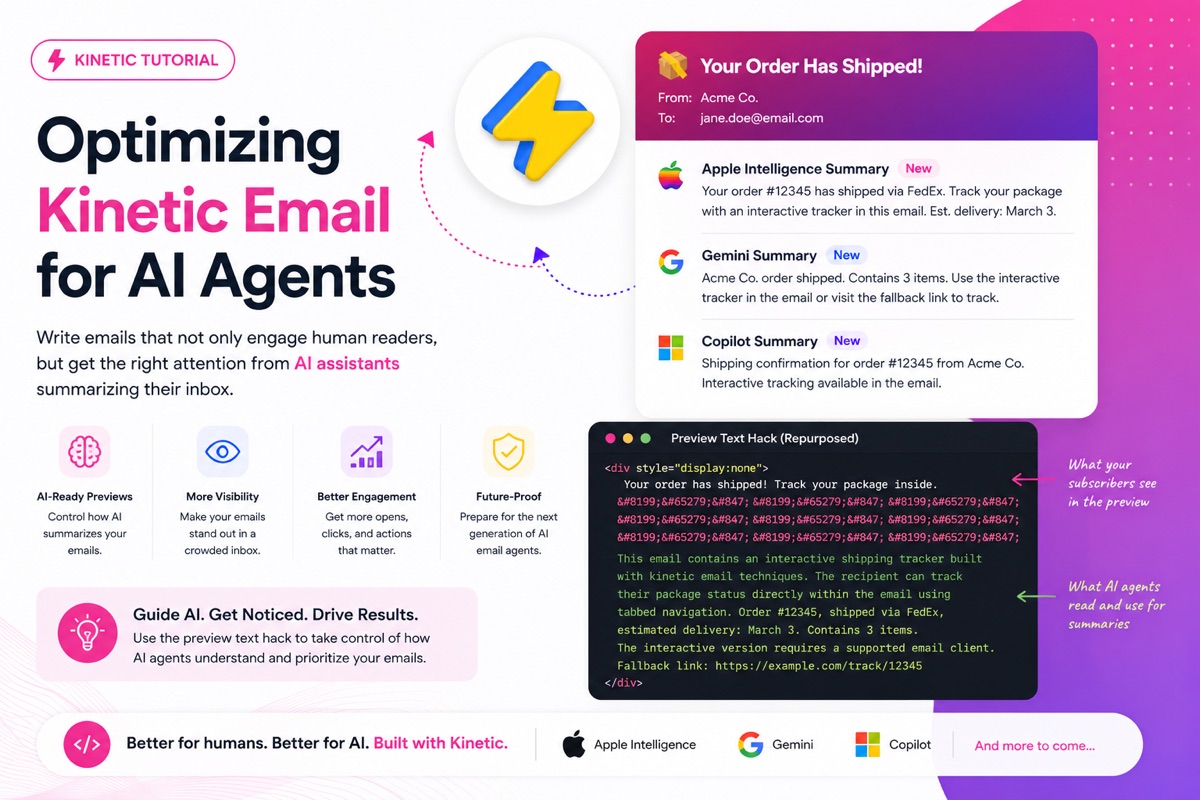
Optimizing Kinetic Email for AI Agents
By Sean · February 24, 2026 · 11 min read
Your subscribers are getting a new assistant, and it's reading their inbox before they do.
Apple Intelligence, Gmail's Gemini, Outlook Copilot—they're already summarizing and prioritizing emails for millions of users. When Apple Intelligence generates that one-line summary in your inbox, it doesn't render your CSS. It doesn't click your checkboxes. It reads the raw HTML and decides whether your email is worth the human's attention.
For kinetic email developers, that's a problem. But it's also an opportunity, because nobody is really talking about this yet. And the solution starts with a technique most email developers already know.
The Preview Text Hack, Repurposed
If you've been in email development for more than a week, you've seen the preview text pattern—a hidden div at the top of your email that controls what shows in the inbox preview pane, followed by a string of whitespace entities that prevent the email client from pulling in body text after it.
Here's the standard version:
<div style="display:none">
  Your order has shipped! Track your package inside.
</div>
Simple enough. But here's what most people don't realize: AI summaries parse the full contents of this hidden div, not just the preview-length portion. The human sees "Your order has shipped! Track your package inside." in their preview pane and stops there. The AI reads everything.
Hat tip to Jay Oram of Action Rocket, who showcased this preview-text-for-AI technique at the Customer.io Unpacked Conference in 2026.
That means we can use the whitespace entity hack—the same one we use to prevent body text bleed—to separate the human-facing preview text from an extended AI-facing context block:
<div style="display:none">
Your order has shipped! Track your package inside.
 ͏  ͏  ͏
 ͏  ͏  ͏
 ͏  ͏  ͏
This email contains an interactive shipping tracker built
with kinetic email techniques. The recipient can track
their package status directly within the email using
tabbed navigation. Order #12345, shipped via FedEx,
estimated delivery: March 3. Contains 3 items.
The interactive version requires a supported email client.
Fallback link: https://example.com/track/12345
</div>
Let's break down what's happening. The first line is your normal preview text—what the human sees. Then comes the wall of whitespace entities:   (punctuation space),  (zero-width no-break space), and ͏ (combining grapheme joiner). These characters push everything after them far enough that no email client will display the remaining text in the preview pane.
But the AI summary engine doesn't care about the preview pane. It reads the entire div. So after the whitespace wall, you write a plain-English description of what the email actually contains, what the interactive elements do, and what action you want the recipient to take. Apple Intelligence, Gemini, and Copilot all pick this up when generating their summaries.
You built an interactive product showcase with five tabs, smooth transitions, and a "shop now" CTA behind each one. Without guidance, the AI summarizes your email as "promotional content from [Brand]" and buries it under a meeting invite. With the preview text hack, you control the narrative. The AI produces a summary like "Interactive product showcase from [Brand] with 5 new arrivals—browse and shop directly in the email."
The whitespace entities are invisible characters that render as empty space. The AI reads right through them to the context below. You're writing a brief for the machine, hidden behind the same trick you already use for preview text.
But That's Not Enough
Here's the thing—optimizing for email client summaries is just the first wave. Apple Intelligence and Gemini run inside the email client. They summarize. They categorize. They help the user skim faster. But they're passive. The user still opens the email, still reads it, still decides what to do.
The next wave is different. The next wave is personal AI agents that don't just summarize your inbox—they manage it. They read every email, decide what matters, draft replies, consolidate the important stuff, and hand the user a curated briefing. The user might never open your email at all. Their agent already did.
This is where things get interesting for kinetic email developers. And this is where we need to talk about OpenClaw.
Enter OpenClaw
If you haven't heard of it yet, you will. OpenClaw is an open-source personal AI agent that went viral in early 2026, racking up millions of installs after a single Hacker News post. Created by Peter Steinberger, it's a self-hosted AI assistant that runs on your own hardware—a Mac mini, a Linux server, a Raspberry Pi, a cloud VPS—and connects to large language models like Claude, GPT, Gemini, or open-source models like DeepSeek.
What makes OpenClaw different from Siri or Google Assistant is that it's always on, it runs autonomously, and you talk to it on the channels you already use: WhatsApp, Telegram, Slack, Discord, iMessage, even SMS. You message your agent "check my email" and it does. You say "what's important today?" and it tells you. You can set it to run on a schedule with its "heartbeat" feature—waking up every 15 minutes to check your inbox, your calendar, your notifications, and proactively surfacing what matters.
Setting it up is straightforward. You run openclaw onboard in your terminal, the wizard walks you through connecting your channels and skills, and within minutes you have a personal AI agent running 24/7. For an even easier path, services like AgentClaw.now deploy a fully working OpenClaw agent in under 60 seconds with all the major messaging integrations out of the box.
Email Is Why People Run OpenClaw
OpenClaw's capabilities are extended through "skills"—community-built plugins hosted on ClawHub, a registry with thousands of options. There are skills for everything from file management to smart home control to browser automation. But email management is one of the top skills in the ecosystem and a primary driver of OpenClaw's explosive adoption.
Inbox triage is the killer feature. And people are getting creative with it. Here's how some users are running their OpenClaw email setups:
- The overnight triage. Set the heartbeat to run every 15 minutes. The agent reads every new email, categorizes it (urgent / needs reply / FYI / promotional / spam), drafts replies for anything straightforward, and pushes a morning briefing to WhatsApp: "You got 47 emails overnight. 3 need your attention. I drafted replies for 8. Here's your summary."
- The chat-driven inbox. Users message their agent on Telegram or iMessage throughout the day: "Any emails from the design team?" or "Summarize what came in after lunch." The agent queries the inbox in real time and responds conversationally.
- Rule-based auto-handling. Users define rules in natural language: "Auto-archive anything from newsletters unless it mentions pricing changes. Flag anything from my manager. Draft a polite decline for cold sales outreach." The agent follows these rules continuously without being asked.
- The weekly digest. Some users only check email once a week. Their OpenClaw agent handles everything in between—replying, filing, flagging—and produces a weekly report of what happened, what it handled, and what still needs the human.
The common thread: the human is increasingly removed from the initial email interaction. The agent reads first, decides first, acts first.
Think about what this means for email marketers. Your subscriber's AI agent is reading every email that arrives. It's deciding which ones to surface, which ones to summarize, which ones to auto-archive, and which ones to flag for human attention. Your email isn't just competing against other emails in the inbox anymore—it's competing for the agent's attention first, and the human's attention second.
The Question We Need to Answer
This is the question I keep coming back to: How can our emails be influential to not just the human, but their personal AI agent?
The preview text hack gets us part of the way there with email client summaries. But an OpenClaw agent parsing your email is a fundamentally different interaction than Apple Intelligence generating a preview summary. The agent is making decisions. It's categorizing. It's prioritizing. It might draft a reply or take an action on behalf of the user. The more context and structure you give it, the better those decisions will reflect what you actually want.
So here's our theory, and the tactics we're going to test.
Tactic 1: The Extended Preview Text Context
We covered this above, but it bears repeating in this context. The preview text whitespace hack isn't just for email client summaries—OpenClaw agents parse the full HTML too. Writing a clear, structured context block after the whitespace wall gives any AI parsing the email (whether it's Apple Intelligence, Gemini, or a personal agent) the information it needs to accurately represent your email.
The key is to write it like a brief. What is this email? What does it contain? What action should the human take? Why should they care?
Tactic 2: Schema.org Structured Data
Embedding JSON-LD gives agents structured, machine-readable metadata about your content.
<script type="application/ld+json">
{
  "@context": "https://schema.org",
  "@type": "EmailMessage",
  "description": "Interactive product feedback survey — 3 questions, takes 1 minute",
  "potentialAction": {
    "@type": "ViewAction",
    "name": "Take the Survey",
    "target": "https://example.com/survey/abc123"
  }
}
</script>
Gmail already parses Schema.org markup and surfaces ViewAction as native action buttons above the email. An OpenClaw agent parsing the same HTML will find that structured data and know exactly what the email is asking the user to do—and can recommend it, or even act on it.
Our theory: structured data will become increasingly important as agents move from summarizing to acting. If the agent can parse a clear ViewAction with a target URL, it can proactively suggest the action to the user instead of waiting for them to open the email.
Tactic 3: A Well-Crafted text/plain
Most kinetic email developers spend hours on the HTML version and let the text/plain part auto-generate into garbage. AI agents often read the plain text part first for quick summarization. An OpenClaw agent triaging 200 emails at 3am is going to lean heavily on the plain text version.
Hi [Name],

We'd love your feedback on your recent order (#12345).

This email contains an interactive survey you can complete
right in your inbox. If your email client doesn't support
interactive emails, use this link:
https://example.com/survey/abc123

QUESTIONS:
1. How satisfied are you with the product?
2. How was the delivery experience?
3. Would you recommend us?

Takes about 1 minute. Your feedback directly shapes
what we build next.
Clear, structured, easy to parse. The agent immediately understands: this is a survey, here are the questions, here's the link, and it takes one minute. That's a much better input for a triage decision than "promotional content from [Brand]."
Tactic 4: Semantic HTML and ARIA
ARIA attributes and data attributes give machine readers context about interactive elements, even when they can't render the CSS.
<div role="group"
     aria-label="Customer Satisfaction Survey"
     data-kinetic-type="survey"
     data-kinetic-questions="3"
     data-kinetic-estimated-time="60">
  <div role="radiogroup"
       aria-label="Question 1: How satisfied are you?">
    <input type="radio" id="q1-great" name="q1"
           aria-label="Very Satisfied">
    <label for="q1-great">Very Satisfied</label>
  </div>
</div>
An agent parsing this HTML can read the aria-label attributes and understand it's a satisfaction survey with specific questions and answers—even without rendering a pixel. This doubles as good accessibility practice. Screen readers and AI agents benefit from the same markup.
Tactic 5: Optimized Preheader for Both Audiences
The preheader is often the first text any AI system uses. Most emails waste it.
Before:
<span style="display:none">Check out our latest deals!</span>
After:
<span style="display:none">Interactive survey inside — 3 questions about
your recent purchase. Complete in-email or via link. Takes 1 minute.</span>
The second version gives both the email client AI and a personal agent a clear picture of what's inside and what to do with it. Descriptive beats promotional every time when the first reader is a machine.
How We're Going to Test This
We're not publishing theories as facts. Here's the testing plan:
Phase 1 — Baseline. We'll send kinetic emails without any of these optimizations to test accounts across Apple Mail (Apple Intelligence), Gmail (Gemini), Outlook (Copilot), and an OpenClaw agent. We'll document how each system summarizes, categorizes, and prioritizes the emails.
Phase 2 — Individual tactics. We'll test each tactic independently against the baseline. Does the preview text hack change the Apple Intelligence summary? Does Schema.org affect how an OpenClaw agent triages the email? Does a better text/plain part move the needle?
Phase 3 — Stacked optimization. We'll combine the winning tactics and test the fully optimized email against the baseline. The goal: measurably better AI summaries, higher priority classification, and more accurate agent recommendations.
Phase 4 — Integration. We'll bake the proven tactics directly into our AI-generated emails so every kinetic email that comes out of our sandbox is already optimized for AI agents.
Open Questions
There are some things we genuinely don't know yet:
- Deliverability impact. Does the extended preview text context block trigger spam filters at scale? The whitespace entities are well-established, but adding paragraphs of AI-targeted text after them is new territory.
- Agent weighting. How do different agents weight preview text vs. Schema.org vs. plain text vs. HTML body? Is there a hierarchy, or does it depend on the model?
- The checkbox hack problem. When an AI agent parses a kinetic email using the checkbox hack, does it see the fallback state or the interactive state? This affects what content the agent summarizes.
- Emerging standards. Is there a formal specification coming for AI-readable email metadata? Schema.org covers some ground, but nothing specific to interactive email yet.
We'll share results as we test. This is an evolving space, and the answers will probably change as these agents get smarter.
Make sure you subscribe to blog notifications so you don't miss the results post. We'll break down exactly what worked, what didn't, and what surprised us.
The inbox is changing. Your subscribers are increasingly going to experience your emails through the lens of an AI agent—whether it's a built-in summary feature or a full personal assistant like OpenClaw managing their entire inbox. The email developers who figure out how to speak to both audiences—the human and the machine—will have a significant edge.
Let's make sure kinetic email is ready for that.